22端口抽风
前一天还能push,今天一push,就报:
1 | Ssh: connect to host github.com port 22: Connection timed out Could not read from remote repository. Please make sure you have the correct access rights and the repository exists. |
记录一次github 22端口抽风日常
前一天还能push,今天一push,就报:
1 | Ssh: connect to host github.com port 22: Connection timed out Could not read from remote repository. Please make sure you have the correct access rights and the repository exists. |
出现 ssh: connect to host github.com port 22: Connection timed out 错误,通常是由于网络或配置问题导致无法通过默认的SSH端口22连接到GitHub。以下是解决方法:
临时测试连接
在命令行中运行以下命令来测试连接:
1 | ssh -T -p 443 git@ssh.github.com |
如果显示类似 Hi <username>! You've successfully authenticated, but GitHub does not provide shell access. 的信息,则表明通过443端口成功进行了身份验证。
修改SSH配置文件
修改 ~/.ssh/config 文件,添加以下内容:
1 | Host github.com |
保存文件后,再次运行以下命令测试连接:
1 | ssh -T git@github.com |
如果连接成功,显示Hi <username>! You've successfully authenticated, but GitHub does not provide shell access.,之后就可以正常进行git操作了。
如果此时还不能正常操作,或者提示permission deny,则你需要去到.ssh文件夹下(一般位于),删除known_hosts让git重新生成指纹
原因分析
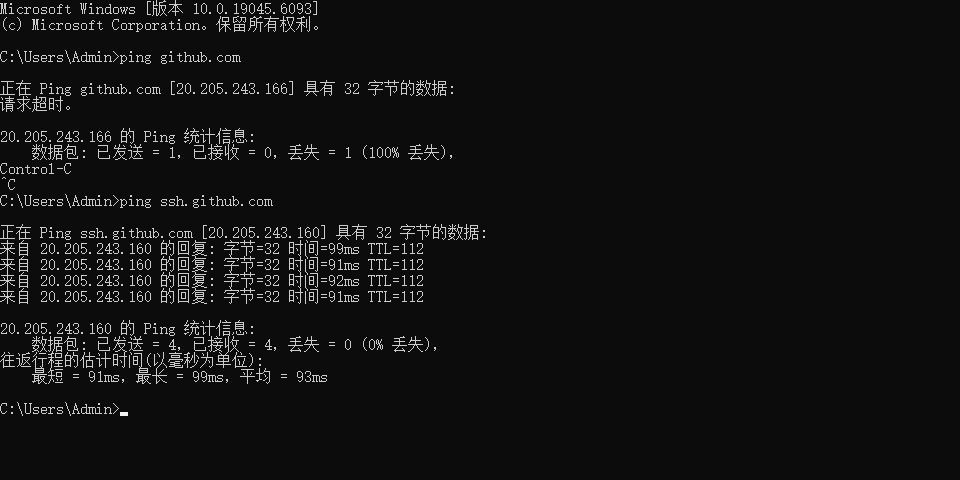
出现这个问题很大概率是Github的主域名github.com,被墙了或者维护了,你ping不上去,此时可以尝试使用ssh.github.com,因此上面的解决方法相当于将github.com的主机名映射到ssh.github.com去!